Working with Extended Help
Extended Help lets you view Rational Unified Process (RUP) instructions on topics that are relevant to the Rational tools you use. For example, you can start Extended Help from Rational Rose without interrupting your workflow.
In order to use Extended Help, you must install RUP. Extended Help becomes available as soon as the installation is complete.
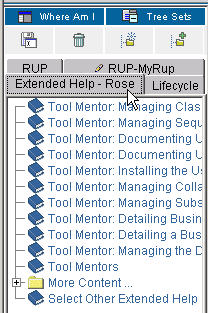
When you select Extended Help from another Rational tool's Help menu, the Extended Help topics appear in a tree panel beside the RUP content. The specific tree panel is identified by the title "Extended Help" and the tool name.
|
The Extended Help tree panel lists topics that are applicable to the tool and context in the tool that you are using. |
 |
The rest of this document explains how to launch and navigate Extended Help.
Using Extended Help
To use Extended Help, follow these steps.
|
In a Rational tool (for example, Rational
Rose), click Help > Extended Help on the tool's menu bar.
|
 |
|
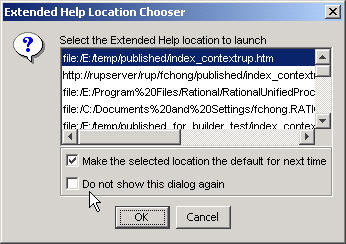
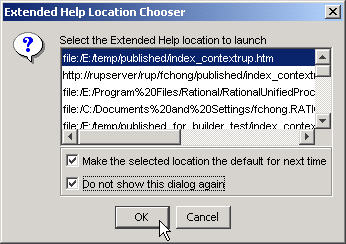
If you have more than one installed or published RUP Web site, an Extended Help Location Chooser dialog box appears, prompting you to choose the location from which you want to view Extended Help topics. For each RUP Web site, there is an Extended Help, and each Web site might have different topics pertaining to the tool that you are using. In the list at the top of the dialog box, select your desired location. If you want, you can select a check box that makes this the default location for the next time you view Extended Help. Another check box allows you choose to never show the dialog box again. If you choose to never show the dialog box again, the default Extended Help location will subsequently be the one that launches automatically. In this example, the user has chosen to make the selected location the default one and to never show this dialog box again. |
|
|
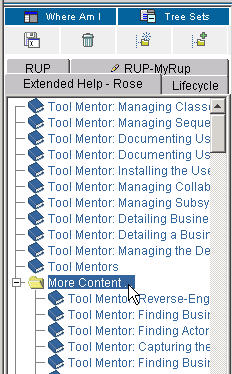
A Web browser opens, displaying the Extended Help tree panel, which lists the appropriate topics. The first page is the an overview that provides basic information about Extended Help. In this example, Extended Help was started from Rational Rose. Therefore, the tree panel is identified by the tab Extended Help - Rose. The 15 most relevant topics are listed first, followed by the rest of the topics in the More Content folder. 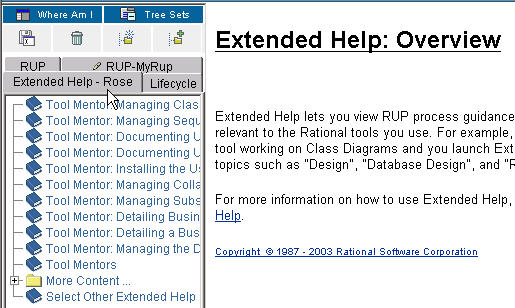 |
|
To view a topic, navigate to that topic and double-click
to expand it in the tree browser. 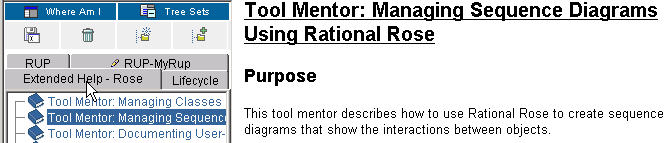 |
|
To view the topics in the More Content folder, double-click to expand that folder in the tree. |
|
|
When you want to view topics from other Extended Help locations, click the last node in the tree panel, which is called Select Other Extended Help Locations. The Extended Help Location Chooser dialog box reappears, allowing you to select a different location from which to launch another Extended Help. A Web browser opens and displays the appropriate Extended Help panel. 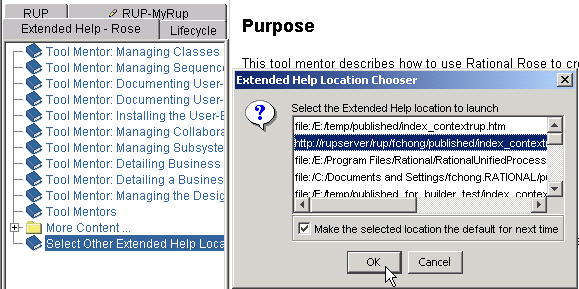 |
